Released CAESES/FFW 3.1
FRIENDSHIP SYSTEMS has released a new version of CAESES/FRIENDSHIP-Framework (FFW) which can be downloaded here.
Highlights
- New Design Viewer
Easily compare your design variants with customized screenshot collections and interactive 3D-geometries of each variant — all in a single window. - Support for Adjoint CFD
Link your adjoint CFD results to parametric 3D geometry for visualization and, in particular, for automatically finding the most important design variables of your model within the shortest time. - New Design Engine: Design Assembler
Create designs based on your own design table that can be configured and imported from a csv-file. With this, you can define your own Design of Experiments. - Additional Import and Export Formats
We now support import and export of ACIS (*.sat) and STEP files as well as import of Parasolid files. In addition, the new IGES translator supports trimmed surfaces. - Comprehensive Design Report
Complementing the existing PDF report, all designs of a result table can now be assessed in a new report — along with screenshots, design variables, objectives and constraints for each individual design. - Beta Version: Boundary Representations
Create trimmed surfaces, radii-based fillets and apply Boolean Operations with a beta version of our new BRep type. Still under development, it already complements the existing geometry functionality, and we are waiting for your feedback on this for further fine-tuning! - What Else?
New internal intersection and projection algorithms, an additional skinning method for meta surfaces for exact match of boundaries, convenient extrapolation of image curves, a new time series viewer for interactive diagrams, a new curve type for pump and compressor design, and many more! See also our changes log for more detailed version information.
Easy Comparison of Variants: The New Design Viewer
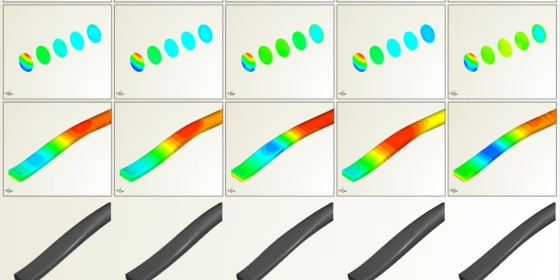
In version 3.1, CAESES/FFW comes with an amazing new widget for convenient comparison of design variants: our new Design Viewer! Screenshots and a 3D-geometry of each variant are intuitively provided to the user in a single window.
The screenshot collections can be configured either before the design engine run (i.e. a DoE or an optimization) or even afterwards. A new dialog in the design results table allows you to set up customized screenshot views. CAESES/FFW automatically steps through selected variants and triggers the screenshot collection so that these images are instantly available in the new Design Viewer.
As a highlight, the 3D-geometries of each variant are also available in this new widget: The user can interactively zoom into details of the variant’s geometry as well as rotate and move the entire 3D-scene — and all the other designs share the same camera for immediate comparisons.
Unique Support for Adjoint CFD
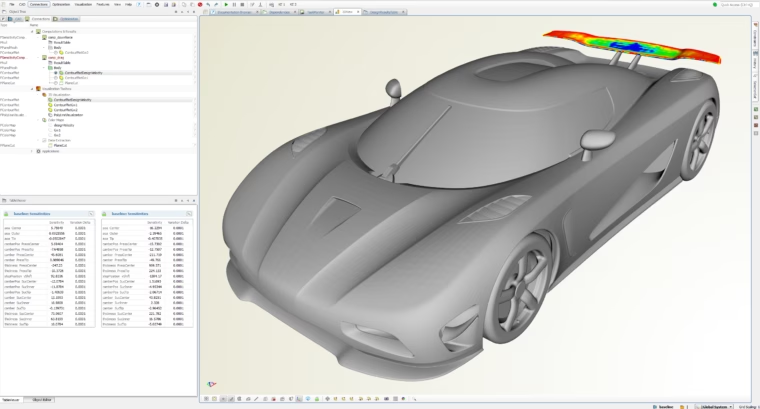
Parametric models of complex geometries are typically controlled by up to 100 parameters, making it difficult for the designer to select the most suitable and relevant parameters for an optimization task, especially if the model was set up by someone else. The first version of our Sensitivity Computation is made for efficient optimization of complex models in connection with adjoint CFD solvers.
In comparison to direct optimization methods, where a new CFD run has to be carried out for each parameter variation, the adjoint analysis answers the question of how to change the parameters for an improvement of a selected objective with only one computation. The result is a shape sensitivity distribution on the model boundary, telling the designer where and in which direction to displace the boundary. Using the shape sensitivities directly to displace the surface cells in a CAD independent approach usually results in shapes that are infeasible for manufacturing, as well as making it difficult to feed the changes back into the design workflow.
The Sensitivity Computation in CAESES/FFW creates a novel and unique connection of the adjoint shape sensitivities with the CAD parameters by determining the boundary displacements of the model due to CAD parameter changes (design velocities) and multiplying them with the shape sensitivities. As a result the designer obtains the sensitivities of all model parameters with respect to the selected objective function. This information can then be used to select the most influential parameters, as well as to modify the geometry within an optimization process.
With this new approach the largest possible design space can be considered, effectively using ALL parameters in the model for optimization, without the need for the designer to understand the effect of each parameter on the geometry. Since the effort does not scale with the number of parameters, parametric sensitivities for all model parameters can actually be computed more quickly than for a small set using the direct approach.
Design Velocities
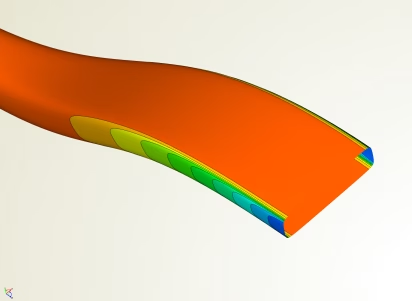
Even users without access to adjoint CFD solvers can benefit from the sensitivity computation. Apart from establishing the connection to adjoint analysis results, the sensitivity computation can conveniently be used to compute and plot the design velocities only, which help you to understand the effect of the parameters on the model.
This first version of this feature is also available in the free CAESES edition. We look forward to receiving feedback from CAESES users!